
- Published on
- Views
Grok Bot vs OpenAI Dots vs Meta Muse: Which AI Agent Should You Use?
- Authors

- Name
- Javed Shaikh
Grok Bot vs OpenAI Dots vs Meta Muse
AI is moving from chatbots that answer questions to agents that can perform tasks.
Grok Bot, OpenAI Dots, and Meta Muse are three examples of this new generation of AI agents.
Instead of asking only:
"What should I do?"
we can increasingly tell an agent:
"Here is the goal. Go and do the work."
Let's compare them using five simple questions.
1. What Can These AI Agents Do?
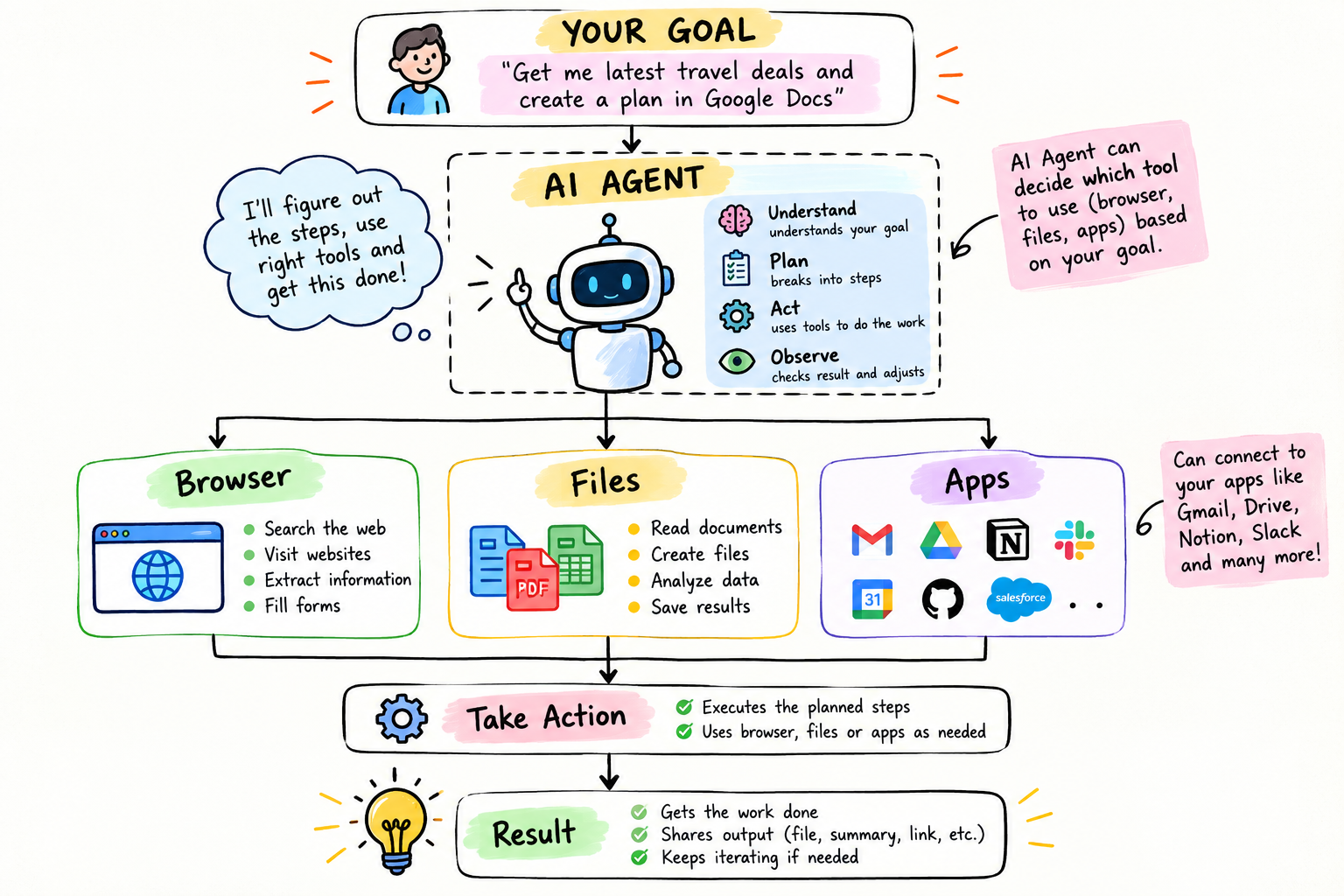
At a high level, all three follow a similar agent workflow:
Grok Bot
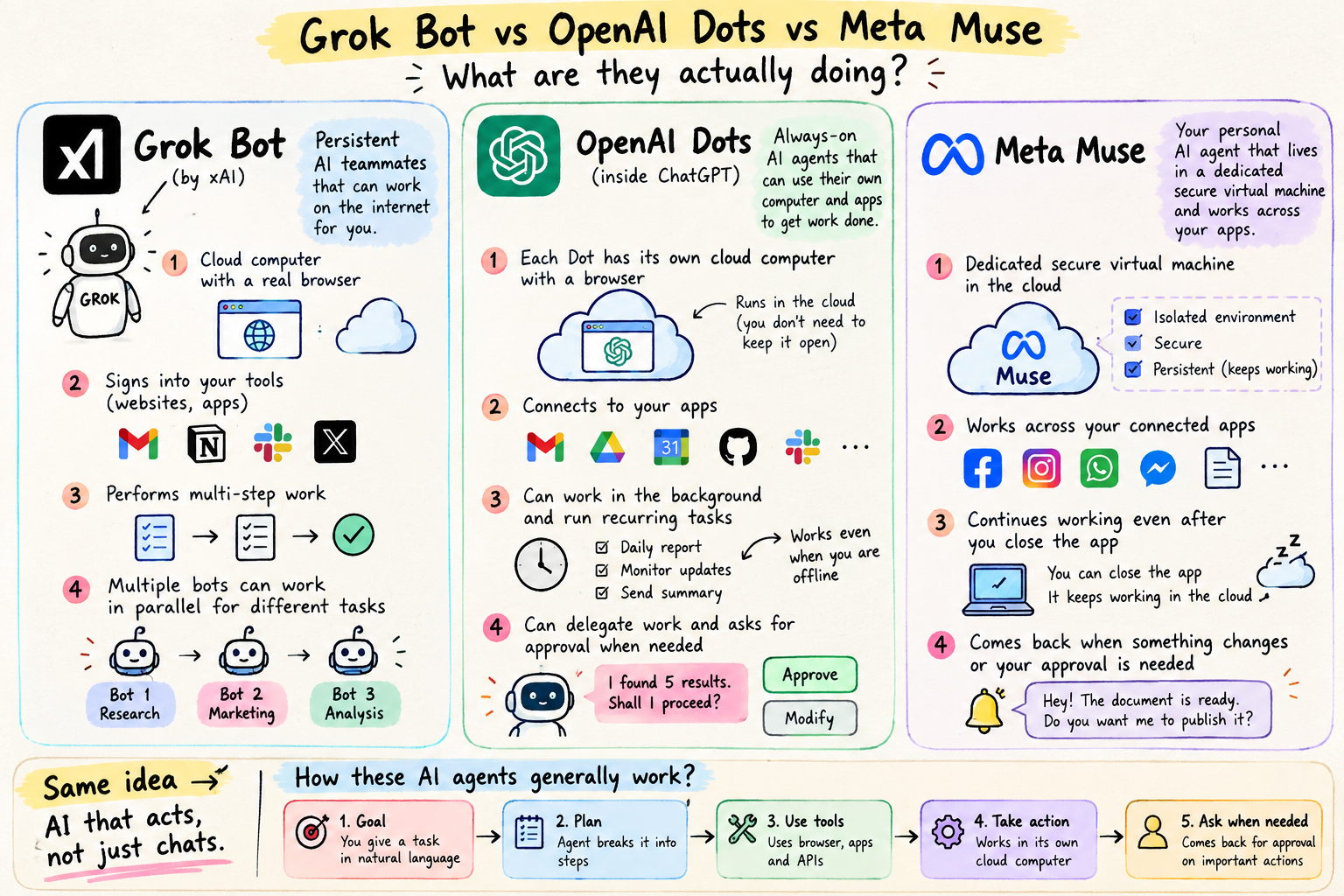
Grok Bot is positioned by xAI as an AI teammate that can use a computer, browser, filesystem and terminal to perform multi-step tasks.
It is particularly relevant to software development and computer-based workflows.
OpenAI Dots
OpenAI Dots are persistent agents inside the ChatGPT ecosystem.
They can work with connected applications and continue working on tasks rather than simply responding to one conversation.
Meta Muse
Meta Muse is positioned as a personal AI agent.
It can browse the web, use connected apps, work on documents, handle shopping-related tasks, set reminders, and continue working toward goals.
2. How Much Does Each One Cost?
Pricing and availability change quickly, so check the official pricing pages before subscribing.
| Agent | Current access / pricing model |
|---|---|
| Grok Bot | Available through eligible paid Grok and Cursor plans |
| OpenAI Dots | Available with eligible ChatGPT plans |
| Meta Muse | Free usage allowance, with paid access where available |
Grok Bot
xAI currently lists SuperGrok at $30/month, with higher tiers available. Grok Bot is also available through eligible Cursor plans.
OpenAI Dots
Dots are currently offered to eligible paid ChatGPT users rather than as a completely separate product. Exact limits depend on the plan and rollout.
Meta Muse
Meta provides a free usage allowance for Muse. Paid access can provide higher usage where available.
3. Which One Is Fast and Reliable?
There is no single meaningful answer without testing the same task on all three.
A useful test is:
Then measure:
| Measure | What to check |
|---|---|
| Speed | Time to first useful result and total completion time |
| Accuracy | Are prices, specifications and sources correct? |
| Reliability | Did the agent complete the workflow without errors? |
| Human intervention | How often did it need help or approval? |
| Result quality | Is the final output actually useful? |
For developers, an even better test is:
"Clone a GitHub repository, find a failing test, identify the cause, fix it, run the tests, and create a pull request without merging it."
That tests the agent on a real software-engineering workflow.
The important distinction
                    SAME TASK
                       │
          ┌────────────┼────────────┐
          ▼            ▼            ▼
       Grok Bot     OpenAI Dots   Meta Muse
          │            │            │
          └────────────┼────────────┘
                       ▼
                 Compare Results
                       │
             ┌─────────┼─────────┐
             ▼         ▼         ▼
           Speed    Accuracy   Reliability
4. Trust, Privacy and Security — Is It Safe?
This is where AI agents are different from normal chatbots.
A chatbot may only receive your question.
An agent may have access to:
- Calendar
- Files
- Browser sessions
- GitHub
- Applications
- Shopping accounts
- Other connected services
So the question is not only:
"What does the AI know?"
It is also:
"What can the AI access, and what can it do?"
Grok Bot
Grok Bot can operate through a cloud computer and interact with websites, files and applications. xAI documents approval and security controls for agent actions.
OpenAI Dots
Dots can work with connected applications and permissions configured through ChatGPT. OpenAI documents approval mechanisms and protections against risks such as prompt injection.
Meta Muse
Meta says Muse uses a Secure VM and secure credential storage. It also provides approval mechanisms for important actions such as purchases and sending messages.
A simple security rule
Read email       →  Yes
Draft email      →  Yes
Send email       →  Ask first
Delete email     →  Ask first
Make purchase    →  Ask first
5. When Should You Use Which One?
🖥️ Use Grok Bot when...
You want an AI teammate that can work with:
- Code
- GitHub
- Terminal
- Browser
- Files
- Developer tools
Example:
"Review my GitHub PRs, run the tests, investigate failures and prepare a new PR."
🧠 Use OpenAI Dots when...
You already work heavily inside the ChatGPT ecosystem and want a persistent agent for connected workflows.
Example:
"Check my calendar and connected information every morning and prepare a summary of anything that needs my attention."
🌐 Use Meta Muse when...
You want an agent for personal and everyday tasks.
Example:
"Find the best price for this product, track the price and let me know when it drops."
Quick Comparison
| Grok Bot | OpenAI Dots | Meta Muse | |
|---|---|---|---|
| Primary focus | AI teammate | Persistent ChatGPT agent | Personal AI agent |
| Browser | Yes | Yes, where supported | Yes |
| Files | Yes | Yes, where supported | Yes |
| Coding workflows | Strong focus | Supported | Not primary focus |
| Background work | Yes | Yes | Yes |
| Connected apps | Yes | Yes | Yes |
| Human approval | Yes | Yes | Yes |
What's Next for AI Agents?
The direction is moving from:
Chatbot
   ↓
AI Assistant
   ↓
AI Agent
   ↓
Persistent AI Teammate
The agent doesn't just answer a question.
It can:
Understand → Plan → Use Tools → Act → Verify → Report
The important shift is from:
"AI that tells me what to do"
to:
"AI that can do the work for me."
And as agents become more capable, permissions, security, reliability and human approval become just as important as the underlying AI model.