
- Published on
- Views
Mastering Kafka with Spring Boot: Building a 'Zero-Failure' Patient Vital Monitoring System
- Authors

- Name
- Javed Shaikh
Why Standard Kafka Tutorials Fail in Real Life
Most tutorials show you how to send a "Hello World" message. But what if that message is a patient's heart rate in a hospital? If you send it twice (duplicate) or if the system lags, the consequences are real.
In this guide, we build Pulse-Guard, a smart hospital monitoring system that uses Java 21 Virtual Threads and Kafka Idempotency to ensure 100% reliability.
1. The Architecture: "Zero-Failure" Design
To make this system "Zero-Failure," we implement three specific patterns:
- Idempotent Producers: Ensures a network glitch doesn't trigger two emergency alerts for the same event.
- Priority Routing: Uses Kafka Headers to jump emergency data to the front of the line.
- Virtual Thread Consumers: Uses Java 21's
VirtualThreadsto handle 10,000+ patient streams without crashing the JVM.
2. The Code: Production-Grade Snippets
A. The Idempotent Producer (Ensuring Accuracy)
We configure our producer to ensure exactly-once delivery to the Kafka cluster.
@Configuration
public class KafkaProducerConfig {

    @Bean
    public ProducerFactory<String, PatientVital> producerFactory() {
        Map<String, Object> config = new HashMap<>();
        config.put(ProducerConfig.BOOTSTRAP_SERVERS_CONFIG, "localhost:9092");
        config.put(ProducerConfig.KEY_SERIALIZER_CLASS_CONFIG, StringSerializer.class);
        config.put(ProducerConfig.VALUE_SERIALIZER_CLASS_CONFIG, JsonSerializer.class);

        // UNIQUE: Enabling Idempotency
        config.put(ProducerConfig.ENABLE_IDEMPOTENCE_CONFIG, "true");
        config.put(ProducerConfig.ACKS_CONFIG, "all"); // Wait for all brokers to confirm
        config.put(ProducerConfig.RETRIES_CONFIG, Integer.MAX_VALUE);

        return new DefaultKafkaProducerFactory<>(config);
    }
}
B. Header-Based Priority Routing
Instead of using separate topics, which can be hard to manage, we use a single topic and attach a priority header to each message. A smart consumer then routes these messages to different processing pools.
The diagram below illustrates how a Header-Based Router inside our Kafka consumer can sort messages into a "Fast Lane" for emergencies and a "Slow Lane" for routine data.
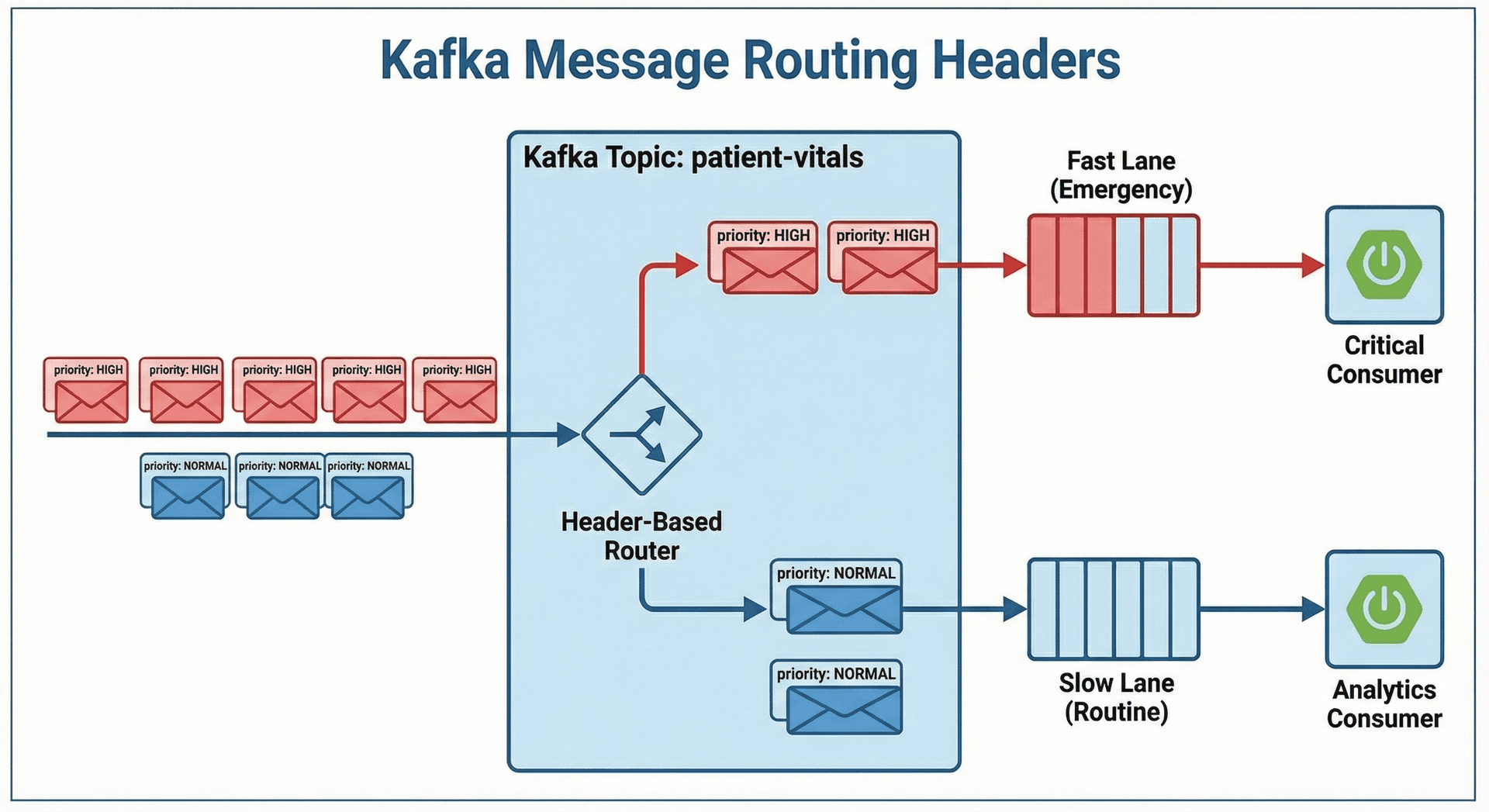
We send "CRITICAL" vitals with a specific header so the consumer knows to prioritize them.
public void sendVital(PatientVital vital) {
    Message<PatientVital> message = MessageBuilder
        .withPayload(vital)
        .setHeader(KafkaHeaders.TOPIC, "patient-vitals")
        .setHeader("priority", vital.getHeartRate() > 150 ? "HIGH" : "NORMAL")
        .build();

    kafkaTemplate.send(message);
}
C. Java 21 Virtual Thread Consumer
Handling thousands of sensors requires efficiency. A traditional thread-per-request model would quickly exhaust system resources. We use Java 21's Virtual Threads to handle high throughput with a small number of carrier threads.
The comparison below shows how virtual threads allow our Spring Boot Vital Processor to handle a massive number of concurrent tasks without blocking, unlike a traditional thread pool.
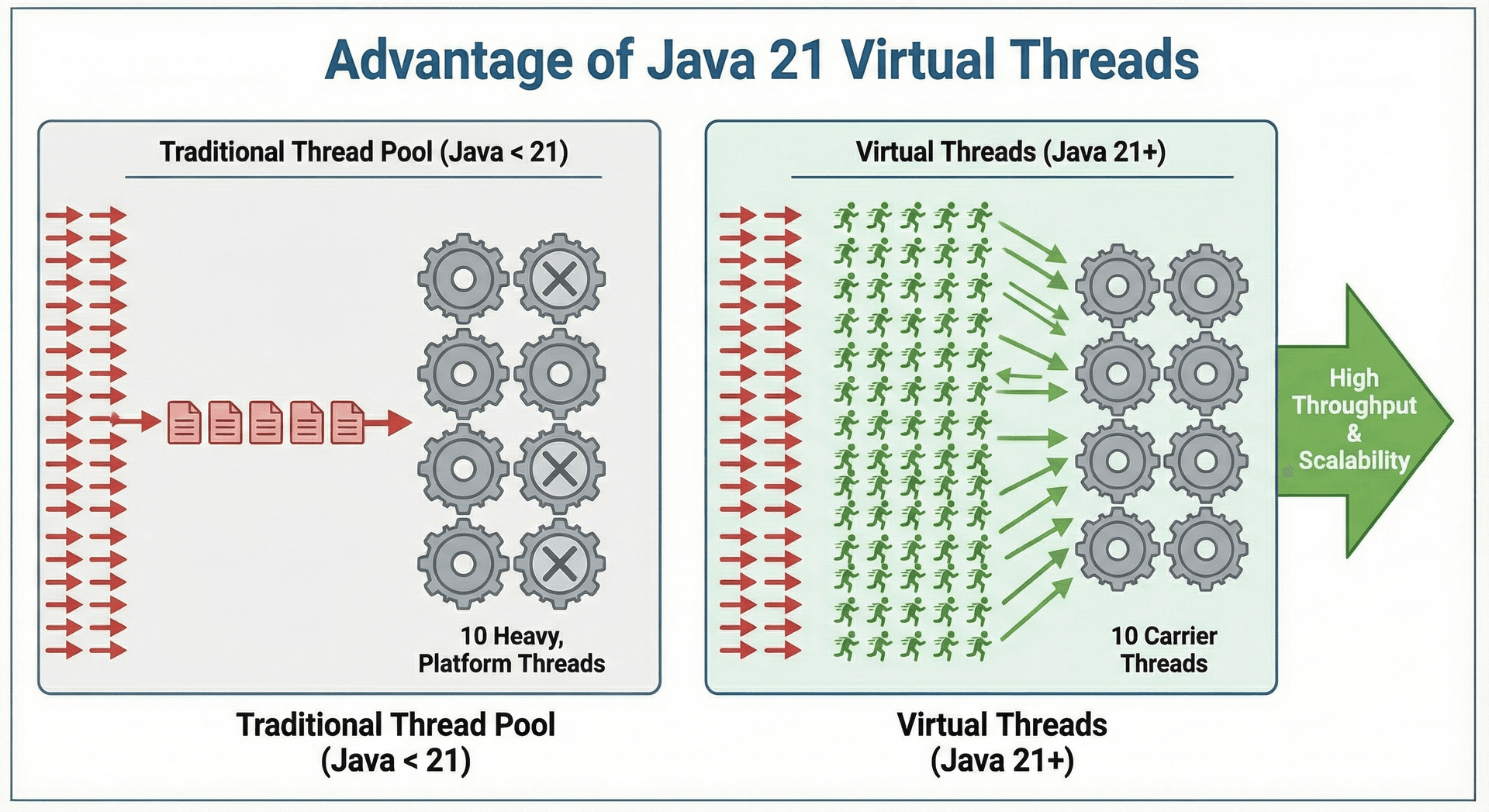
We tell Spring Kafka to use Virtual Threads for its listener containers.
@Configuration
public class KafkaConsumerConfig {

    @Bean
    public ConcurrentKafkaListenerContainerFactory<String, PatientVital> kafkaListenerContainerFactory() {
        ConcurrentKafkaListenerContainerFactory<String, PatientVital> factory =
            new ConcurrentKafkaListenerContainerFactory<>();
        factory.setConsumerFactory(consumerFactory());

        // UNIQUE: Use Java 21 Virtual Threads for non-blocking I/O
        factory.getContainerProperties().setListenerTaskExecutor(
            new VirtualThreadTaskExecutor()
        );

        return factory;
    }
}
3. Interview Insights: What to tell the Interviewer?
Q: How do you handle "Poison Pill" messages in this hospital system? A: "I implement a Dead Letter Topic (DLT). If a vital reading is corrupted (e.g., negative heart rate), the SeekToCurrentErrorHandler catches it and routes it to patient-vitals-dlt so the main pipeline never stops."